What is Support in 3D Printing? Why Are They Essential in 3D Printing
If you’re new to 3D printing, you might be confused by the term “supports” and why they are necessary. In 3D printing, supports are essential structures that help maintain the integrity of your model while it’s being printed, especially when dealing with overhangs, bridges, and floating parts. Without these support structures, certain designs can fail…
If you’re new to 3D printing, you might be confused by the term “supports” and why they are necessary. In 3D printing, supports are essential structures that help maintain the integrity of your model while it’s being printed, especially when dealing with overhangs, bridges, and floating parts. Without these support structures, certain designs can fail or result in poor print quality.
Let’s cover everything you need to know about 3D print support, including the different types, how to add them, and how to choose the right one for your project. We’ll also dive into some common issues related to support, like removal difficulties and how to solve them.
What Are Supports in 3D Printing and Why Do You Need Them?
Supports are temporary structures that are printed alongside your model to support overhanging features, bridges, or disconnected sections that can’t be printed directly due to the nature of the additive process. In 3D printing, a model is built layer by layer. When there are overhanging sections or intricate details, such as bridges or the top parts of letters (e.g., the “T”), they can’t be printed effectively without additional support. Without support, the filament may droop or collapse under its own weight before it has a chance to cool and solidify.
To illustrate this, imagine trying to print the horizontal bar of a “T” shape. The printer will have no material beneath it to keep it stable, and without support, the bar will droop down, ruining the print. Supports prevent this by providing a temporary structure that holds the overhanging part in place during printing.
Different Types of 3D Print Supports
There are different types of supports in 3D printing, each designed to solve specific problems depending on the model’s geometry and the type of 3D printing you’re using. Let’s explore the most common types:
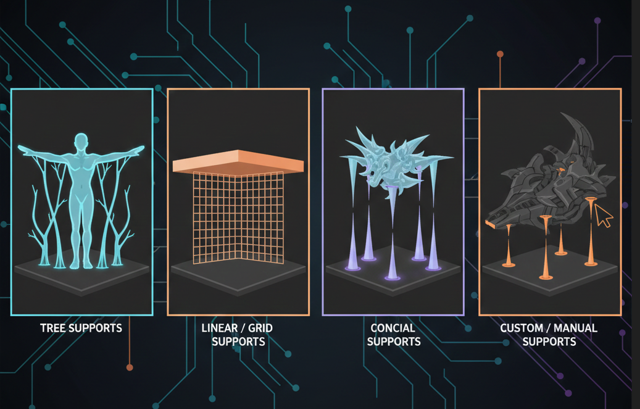
Tree Supports
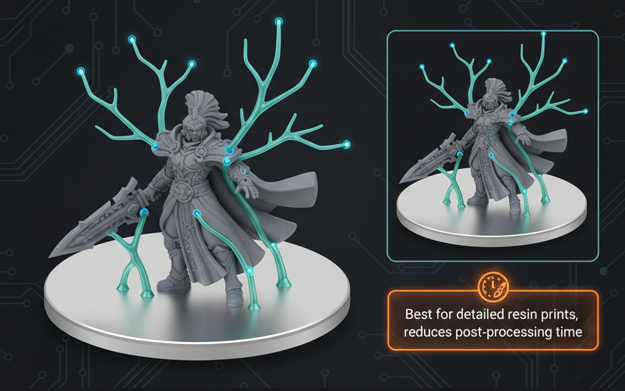
Tree supports are commonly used in resin printing. These supports are designed to be lightweight and minimal, creating a branching structure that extends from the base to the print. Tree supports are ideal because they use minimal contact with the print, which makes them easier to remove and leaves fewer marks on the print surface.
Pros: Easy removal, minimal contact with the print, less material usage.
Cons: Not suitable for all prints, especially large, heavy overhangs.
Linear/Grid Supports
Linear or grid supports are most commonly used in FDM printing. These supports are made up of vertical lines or a grid pattern that provide a stable foundation for large and flat areas. They are strong and offer solid support but can be more difficult to remove compared to tree supports.
Pros: Strong support, good for large, flat overhangs.
Cons: Harder to remove, uses more material.
Conical Supports
Conical supports are similar to tree supports but with a tapering design. These are often used in resin prints for parts that require minimal contact. The tapered nature of the support allows for easier removal and leaves fewer marks on the printed object.
Pros: Minimal contact, easy removal.
Cons: Not always strong enough for heavier overhangs.
Custom Manual Supports
Some slicers like Meshmixer or PrusaSlicer allow for manual support placement, giving you complete control over where the supports are placed. You can add supports wherever you think they are necessary, which is great for complex geometries and parts that need extra support in specific areas.
Pros: Full control, highly customizable.
Cons: Time-consuming, can lead to excess material use.
What Are The Best Support Patterns for 3D Printing?
Choosing the right support pattern is just as important as selecting the correct support type. Support patterns can impact the strength of the support, ease of removal, and overall material use. Here’s a quick guide to the best support patterns for both FDM and resin prints:
For FDM (Fused Deposition Modeling) Prints
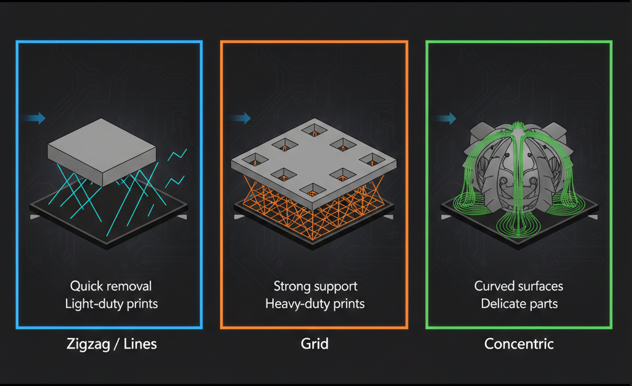
- Zigzag or Lines: These patterns are commonly used for easy-to-remove supports. They work well for basic models, especially with PLA and other easy-to-print filaments.
Best for: Quick and easy removal, light-duty prints. - Grid: The grid support pattern is denser and offers stronger support, making it suitable for more challenging prints, like ABS or overhangs that are extremely long.
Best for: Strong support, heavy-duty prints. - Concentric: This pattern follows the contours of the model, making it ideal for curved surfaces or spherical shapes. It’s especially useful for models with rounded features.
Best for: Curved or spherical shapes, delicate parts.
For Resin Prints
- Tree-like Supports: These are perfect for smaller, more intricate prints and are often used in resin printing due to their minimal contact and easy removal.
Best for: Detailed resin prints, reducing post-processing time.
When to Use Support in 3D Printing?
Support is necessary whenever your model has features that extend too far into open air. Here are some common cases when supports are required:
- Overhangs Greater Than 45°: The “45-degree rule” states that any feature extending more than 45° from vertical will likely need support to print correctly.
- Bridging Gaps: When there are long horizontal stretches (bridges) in your design, the filament needs to be supported to prevent sagging.
- Floating or Disconnected Parts: Any part of your print that starts floating in mid-air without being attached to the base needs support to anchor it.
Typical examples that require supports include:
- Canopies or roofs with steep overhangs.
- Holes in models that are upside-down.
- Top sections of letters like “T,” where the horizontal bar would droop without support.
- Any intricate detail that has no direct material beneath it.
How to Add Support to Your 3D Print?
If your slicer doesn’t automatically add enough supports, you can manually adjust them to suit your needs. Here’s a step-by-step guide for adding supports in popular slicer software:
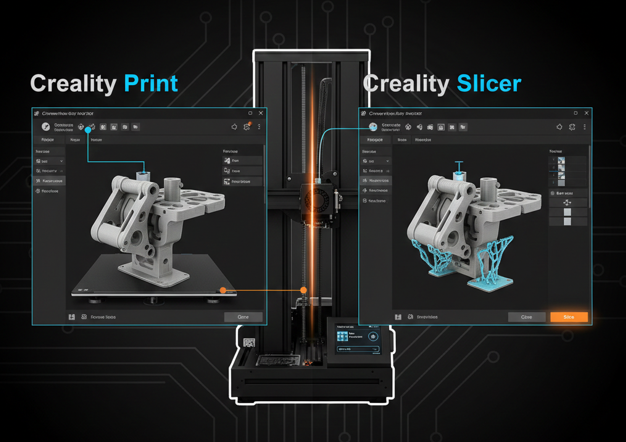
Using Creality Print
Step 1: Open Creality Print and load your model.
Step 2: In the “Prepare” menu, go to “Support” settings.
Step 3: Choose between “Normal” and “Tree” support options, depending on your model.
Using Autodesk MeshMixer
Step 1: Open MeshMixer and load your STL file.
Step 2: Use the “Auto-Generate Supports” option for tree-like supports or manually add supports where needed.
Step 3: Fine-tune the placement and density to ensure adequate support without excessive material usage.
Using Chitubox or Lychee for Resin Prints
These slicers automatically generate and optimize supports for resin prints, providing an easy solution for adding supports that don’t interfere with fine details.
Why Removing Supports Can Be Challenging?
While supports are crucial for ensuring print quality, they can sometimes be difficult to remove cleanly. This issue is often caused by high support density, poor placement, or an inappropriate support pattern. To improve support removal:
- Lower the support density in your slicer settings to make supports easier to break away.
- Switch to a “breakaway” friendly support pattern, like zigzag or tree supports, which are easier to remove.
- For resin prints, use supports with minimal contact points to reduce the chance of marks on the model.
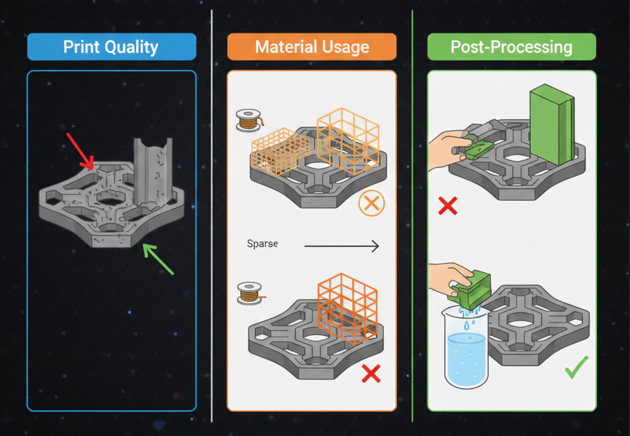
Impact of Supports on Print Quality, Material Usage, and Post-Processing
Support structures impact several aspects of 3D printing:
- Print Quality: Improperly designed supports can leave marks or blemishes on the surface of the model, especially where the supports connect to the print. These marks can be difficult to remove and may affect the model’s appearance.
- Material Usage: The type of support and its density can significantly affect the amount of filament or resin used. More complex support structures generally consume more material, increasing printing costs and time.
- Post-Processing: After printing, supports must be removed. For breakaway supports, this process is typically straightforward but can leave visible marks. Soluble supports simplify the process, though they require access to a bath or solvent, which may not always be available.
When Supports Should Be Avoided
In some cases, using supports can be unnecessary or counterproductive:
- Minimal Overhangs: For models with slight overhangs (less than 45 degrees), supports may not be necessary. Many 3D printers are capable of printing shallow overhangs without support, especially if the print orientation is adjusted.
- Support-Free Geometries: Some designs are inherently support-free, using features such as self-supporting angles or interlocking parts that can be printed without needing additional support structures.
- Model Optimization: Designers can often adjust model orientations or modify the geometry to reduce or eliminate the need for supports altogether. For example, rotating the model or splitting it into multiple parts can help avoid support requirements.
Practical Tips for Beginners
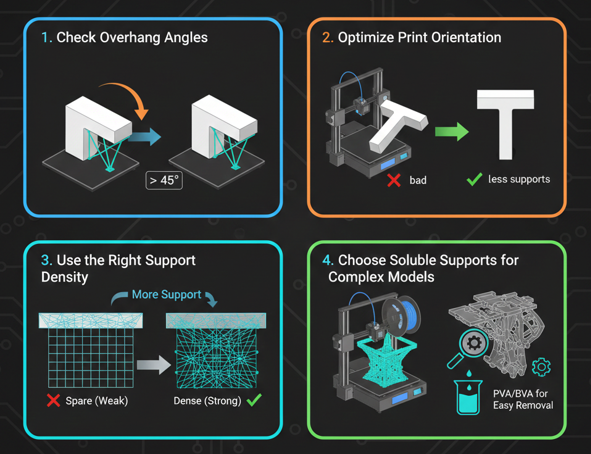
- Check Overhang Angles: Ensure that any overhangs greater than 45 degrees have proper support to avoid failed prints.
- Optimize Print Orientation: Consider rotating the model to minimize the need for supports. Placing the model in an optimal orientation can reduce the number of supports required and improve surface finish.
- Use the Right Support Density: Too dense supports can make removal difficult, while too sparse supports may not provide enough stability. Adjust the support density based on the model’s complexity.
- Choose Soluble Supports for Complex Models: If your printer supports dual extrusion, soluble supports can simplify the removal process, especially for models with intricate details or delicate features.
Conclusion
Support in 3D printing is essential for ensuring high-quality prints, particularly when dealing with complex geometries like overhangs and floating parts. By understanding the different types of supports, knowing when to use them, and learning how to customize them, you can significantly improve your print results and reduce frustration. With the right support patterns and strategies, you can print even the most intricate designs with confidence.
Why is it hard to remove the 3D printing supports?
It could be due to high support density, poor placement, or wrong support pattern. Try lowering density or switching to a more breakaway-friendly style like zigzag.
What is the difference between support touching base plate and everywhere?
A “touching base plate” means supports are only generated from the build plate up. “Everywhere” supports are also generated above the print, which provides better stability but can be harder to clean.
When should I manually add supports to my 3D print?
You should manually add supports if your slicer misses important areas or if you want more precise control over where supports are placed.
Can I print without support in certain cases?
Yes, if your model doesn’t have overhangs greater than 45° or features that require bridging, you may not need support. Always preview your model in your slicer to check for potential issues.
How do I optimize supports for resin prints?
For resin prints, use tree supports with minimal contact points to avoid damaging fine details. Slicers like Lychee and Chitubox provide advanced algorithms that automatically optimize support placement for resin prints.
What support style is best for large prints?
For large prints, grid supports are often the best choice because they offer robust support. However, they can be tougher to remove, so consider the tradeoff between support strength and ease of removal.
How can I improve support removal for complex prints?
Reduce support density, use lighter touch support types like tree supports, and experiment with different support patterns to make removal easier without sacrificing print quality.

I share practical insights on the latest 3D-printing software and hardware, helping makers navigate tools and technologies with confidence. My goal is to make digital fabrication simple and accessible for everyone.